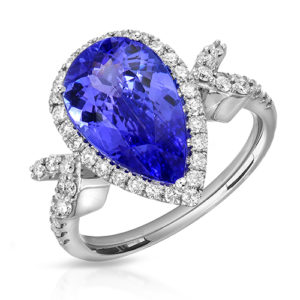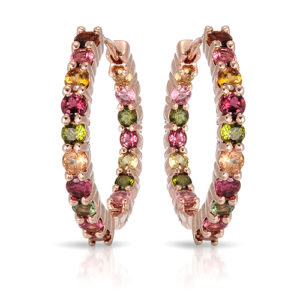

A new collection can lose momentum before it ever reaches your website. Pieces arrive in mixed packaging, SKU details live in separate spreadsheets, approvals stall, and product photos come back without the angles your shoppers need. A clear jewelry catalog workflow turns that pressure into a predictable production process – and gives every ring, pendant, gemstone, and bracelet its best chance to sell.
For jewelry businesses, catalog photography is not simply a batch of product images. It is the visual system behind your product pages, marketplace listings, social posts, wholesale presentations, print materials, and launch campaigns. When the system is organized, your catalog looks polished, your team moves faster, and shoppers can focus on the sparkle instead of wondering what they are looking at.
Start the Jewelry Catalog Workflow Before the Camera
The best catalog shoots are planned before the first piece arrives at the studio. Begin with a complete item list that matches the product names and SKUs used by your e-commerce team. This sounds basic, but it prevents one of the most expensive catalog problems: beautiful images assigned to the wrong product or missing from a listing entirely.
For each item, document the metal color, gemstone type, stone count, dimensions, retail category, and any special details that deserve attention. A pavé shank, hidden halo, engraving, unusual clasp, or natural inclusion may need its own close-up. If a gemstone has a distinctive cut or color treatment, identify that upfront so the photography plan represents it accurately.
Decide what every product needs before shipping or dropping off the collection. A simple stud earring may require a front view, side view, pair shot, and scale image. An engagement ring may need several angles plus macro details that show setting height, prongs, profile, and center stone brilliance. The goal is not to create more images for the sake of it. The goal is to answer the questions that stop an online buyer from adding the item to cart.
Create a Shot Plan That Matches Where You Sell
Your sales channels should shape the shot list. A white-background image is essential for clean product pages and many marketplaces, while a hand-model image helps shoppers understand scale and how a ring sits when worn. Lifestyle banners and creative campaign images give a collection personality for your homepage, email marketing, and social media.
A useful catalog plan often includes four distinct image needs:
- Clean, consistent product views for listings and wholesale catalogs
- Detail or macro images for gemstones, engraving, settings, and craftsmanship
- On-model or hand-model images to show scale, fit, and emotional appeal
- Branded creative images for campaigns, launches, and social content
Not every piece needs all four. A volume catalog may prioritize speed and consistent white-background photography, while a new bridal collection may benefit from more model and campaign work. The right mix depends on your margin, sales channel, brand position, and launch deadline.
Build Consistency Into Every Catalog Image
Consistency is what makes a catalog feel established. Shoppers may not describe the lighting or image crop, but they notice when one necklace looks warm, the next looks gray, and a third is photographed from an entirely different distance. Inconsistency creates friction. Consistent imagery creates confidence.
Set visual standards for background, cropping, image dimensions, angles, shadow treatment, and file naming. If your gold jewelry is photographed on white, keep the color balance accurate across the full collection. If your brand uses a soft shadow, make it a repeatable choice rather than an occasional effect. If rings are displayed at a particular angle, establish that angle as the default.
This is especially important with reflective metals and gemstones. Jewelry can pick up unwanted reflections from the room, camera, and surrounding surfaces. A specialist studio controls those reflections while preserving the depth, facets, polish, and fire that make the piece desirable. Over-retouching can make metal look flat or stones look artificial. Under-retouching can leave dust, scratches, and distracting flaws that have nothing to do with the actual product. The right standard is polished, accurate, and consistent.
Separate Product Accuracy From Creative Styling
Catalog images need to be honest. A buyer should be able to see the correct metal tone, gemstone color, proportions, and setting details. This is why clean product photography should remain the foundation of your visual library, even when you also create dramatic campaign imagery.
Creative images serve a different job. They build desire, set a mood, and give your collection a recognizable point of view. A close crop of a diamond bracelet on a model can feel luxurious and expressive. It should not replace the straightforward product views a shopper needs to assess the clasp, profile, and overall construction.
Treat these image types as partners. Product images reduce hesitation. Creative images make people want to look closer.
Organize Handoffs, Approvals, and File Delivery
A catalog can be photographed perfectly and still become difficult to launch if file delivery is disorganized. Establish one source of truth for the item list, shot status, retouching notes, and approvals. Your merchandising, marketing, and web teams should be able to identify what is ready, what needs revision, and what is still missing without sorting through long email threads.
File names should connect directly to your SKU system. Add a clear view identifier, such as front, side, detail, model, or lifestyle, rather than relying on vague names like “final-final-2.” This makes it easier to upload images, find assets months later, and reuse them for a new campaign or retailer request.
Approval is faster when feedback is specific. Instead of saying that a ring “does not pop,” point to the needed adjustment: brighten the center stone slightly, correct the yellow gold warmth, remove a visible reflection, or use the alternate profile angle. Consolidate internal feedback before sending it to the photography team. One clear revision round protects both turnaround time and budget.
At TN Connections Inc, this production discipline is part of making high-resolution jewelry photography practical for both large catalogs and growing brands. Fast delivery matters, but it only helps when the files arrive organized, retouched, and ready for the places you actually sell.
Plan for Launches, Reorders, and New Collection Additions
A catalog workflow should not end when a collection goes live. Jewelry lines change constantly. Best sellers need fresh content, new colorways arrive, matching pieces are added, and retailers request assets in different formats. The easiest way to keep up is to retain the same lighting, angles, background standards, and naming structure for future additions.
Save the approved shot plan and visual references from each production cycle. When you add ten new pendants three months later, you should not have to reinvent the catalog look. A repeatable system makes the new pieces feel like they belonged in the collection from the beginning.
It also helps to build extra production time ahead of trade shows, holiday launches, and major marketplace updates. Rush work is sometimes unavoidable, but jewelry deserves careful handling and detailed retouching. A realistic schedule gives your team room to review images, prepare listings, and create promotional materials without sacrificing quality.
Measure Whether Your Images Are Doing Their Job
Photography should be judged by more than whether it looks gorgeous on screen. Watch for practical signals after new images go live: product-page engagement, conversion rate, returns tied to inaccurate expectations, customer questions about scale or color, and the speed at which your team can publish a new SKU.
If shoppers repeatedly ask how large an item is, add a model, hand, or scale reference. If customers question a gemstone’s color, review your color accuracy and product descriptions together. If product launches are slow, the bottleneck may be the handoff process rather than the photography itself.
A well-run catalog is a sales tool that keeps working long after shoot day. Give each piece accurate detail, consistent presentation, and a file path your team can trust. That is how a growing jewelry collection stays easy to manage and genuinely exciting to shop.